Web Scraping Without Getting Blocked: A Practical Guide


A request to a website passes through several layers: network, protocol, browser, and behavior. With a real user, those layers tend to line up naturally. Automation can introduce mismatches between them, and that is often where scraping starts to run into blocking.
Reliable web scraping is still possible. The practical challenge is to build a collection process that is stable, measurable, and appropriate for the website being accessed, while accounting for reliability and scale before they become operational problems.
This guide focuses on one question: How can web scraping systems reduce blocking and maintain reliable access?
The consistency problem: six layers that must align
It helps to think of each request as passing through six operational layers. Each layer contributes to whether a collection workflow remains consistent and reliable:
- Proxy – the network path and location used to access the website
- Connectivity – how the connection to the website is established
- Profile – the technical profile presented by the client
- HTTP – requests, headers, cookies, and sessions
- Browser – the browser environment used to access and render the website
- Behavior – how requests and navigation occur over time
You usually do not need to optimize every layer independently. The useful approach is to establish a reliable baseline, understand the requirements of the collection workflow, and keep the relevant components consistent.
That habit – measure first, assume less – is the foundation of reliable scraping without getting blocked.
Phase 1: Prove a single scrape works (your ground truth)
Before thinking about cost or throughput, first prove that the data is reachable.
Start with a ground-truth process: the simplest manual flow that reliably gets you to the data.
- Real Chrome (or the browser the site expects)
- The right geography or network (e.g., Australian residential IP)
- Manual navigation through the app until you see the target data
Document it: IP type, browser version, navigation steps, and waits. At this point, you do not need to know which detail matters. You only need a process you know works.
Then try the simplest automated version that fits the website and the data requirement. Depending on the target, that may be an HTTP-based collector or a browser-based workflow.
If the minimal approach is not reliable, use that result to identify which part of the workflow needs more support. Change one component at a time and measure the outcome instead of stacking random fixes.
Example: ground truth vs. minimal automation
The important point is that reliability depends on the collection workflow as a whole. Keep the components that matter to the workflow consistent and avoid unnecessary complexity.
Phase 2: Close the gap – one variable at a time
Avoid changing several things at once. Start from the reliable baseline, change one operational layer, and record what happens.
A few useful areas to review:
- Confirm that the proxy path and geography are appropriate for the workflow
- Check that connectivity remains stable across requests
- Use a consistent client profile and session setup
- Move to a browser-based workflow when the website requires browser rendering or interaction
You are building an operational baseline, not trying to discover hidden website controls. A failed attempt can still show which part of the collection workflow needs attention.
Once you have a reliable setup – including the proxy, session, browser, and client profile where relevant – document it. That becomes your baseline for reliable access. Keep in mind that requirements can differ between websites.
Choosing an approach: cost vs. complexity
These trade-offs are also central to modern web scraping, where the right collection strategy depends on the target, data requirements, and operational scale.
There is no universal best option. Use the simplest approach that remains reliable for the website and volume you need, and expect to revisit that decision as the site or workload changes. For teams that don’t want to manage proxies, browser infrastructure, sessions, and blocking logic themselves, a managed web data unblocker can abstract much of that access layer.
Phase 3: Operate responsibly and reliably
Reliable web data collection is not only about maintaining access. It also means operating responsibly. Request patterns, sessions, proxies, browsers, and retry strategies should be designed to minimize unnecessary load and remain consistent with applicable website policies and access requirements.
The goal is to build a collection process that is both technically reliable and respectful of the websites it interacts with.
Request patterns and rate
Use reasonable and controlled request rates that minimize unnecessary load on the website. Where applicable, respect published access policies, rate limits, and other requirements.
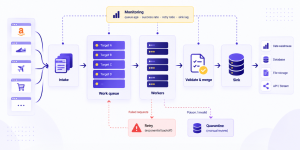
At scale, use domain-level rate controls, queues, and monitoring to keep collection predictable and prevent unnecessary traffic spikes.
Sessions and session consistency
Some websites rely on sessions to maintain continuity between requests. Keeping cookies, authentication state, and related session information consistent can improve reliability and reduce unnecessary repeated requests.
Where sessions are required, manage them predictably and avoid creating unnecessary new sessions or authentication flows.
Proxy management
Proxy infrastructure should be selected based on reliability, geography, performance, and the requirements of the data collection workflow. Poor-quality or unstable proxies can introduce unnecessary failures and inconsistent results.
Track proxy pool health and use production-grade infrastructure. Free proxies, in particular, can introduce reliability, performance, and trust issues that make them a poor foundation for production scraping.
Headers and browser behavior
Use the simplest reliable collection method appropriate for the website. Some websites can be accessed reliably with an HTTP-based workflow, while dynamic websites may require a browser environment for rendering, sessions, or interaction.
A full browser adds operational cost, so use it where the workflow genuinely requires it. If you’re evaluating browser-based collection, understanding how a headless browser works and where it fits can help determine whether the added complexity is justified.
Retry strategies
Retries should be based on the type of failure. Temporary network errors may justify retrying with exponential backoff, while persistent access errors should trigger investigation rather than repeated requests.
Classify failures before automating retries to avoid generating unnecessary traffic.
Monitoring
Responsible collection remains reliable only if you keep measuring the system over time:
- Success rate over time (overall and per target)
- Latency and error-type breakdown
- Proxy pool health
- Session stability where sessions are required
A gradual decline in success rate is a reason to review the workflow, traffic levels, and website requirements rather than simply increasing retries or request volume.
Phase 4: Understand scale before you need it
A workflow that performs well at low volume may behave differently as demand grows. Scaling should therefore be treated as an infrastructure and reliability challenge, with capacity increased gradually and measured continuously.
Infrastructure at scale
As volume grows, focus on the operational systems that keep collection predictable:
- Reliable proxy capacity appropriate for each target or geography
- Session management where the workflow requires continuity
- Queue-based rate controls per domain
- Monitoring for latency, success rates, and error patterns
- Circuit breakers when reliability drops significantly
The same mental model still applies at scale: start from a reliable workflow, increase capacity gradually, measure performance, and address the components that become operational constraints.
A practical workflow (summary)
- Define the requirement → Identify the data and frequency actually needed
- Establish reliable access → Confirm a stable collection workflow
- Validate the workflow → Check data quality, sessions, browser requirements, and reliability
- Collect responsibly → Respect applicable policies and use controlled request rates
- Monitor → Track success rate, latency, and errors
- Scale gradually → Increase capacity while maintaining reliability and responsible collection practices
Reliable web scraping is not about finding ways around every protection mechanism. It is about building a stable, measurable, and responsible data collection process that can operate reliably at scale.
For teams that do not want to manage proxies, browser infrastructure, sessions, monitoring, and access complexity themselves, a managed web data unblocker can provide the infrastructure layer needed to support reliable web data access at scale.
What this guide doesn’t cover
This guide is about operational practice: designing web data collection so that it remains reliable, measurable, and responsible over time.
- Diagnosing specific errors such as 403s, 429s, or CAPTCHAs is a separate problem. Those symptoms and their causes deserve their own treatment.
- The mechanics of anti-bot detection – signals, scoring, and cross-layer correlation – are also a separate topic. This article stays focused on operational scraping design.
Use this framework to design and operate web data collection that holds up over time while keeping reliability, scale, and responsible collection aligned.
Questions About Web Data Scraping Without Getting Blocked
Practical answers on blocking, proxies, browser behavior, sessions, and building reliable scraping at scale.
How can web scrapers avoid getting blocked?
There is no single technique that prevents blocking across every website. A more reliable approach is to establish a working baseline and test variables such as IP type, TLS profile, headers, sessions, browser behavior, and request rate individually. This helps identify what a specific target actually enforces instead of relying on generic scraping rules.
Do residential proxies prevent web scraping blocks?
Not necessarily. Residential proxies can help when a website evaluates IP type, geography, or reputation, but they are not automatically required for every target. The best approach is to test the same working profile across different IP types and compare success rates before deciding what proxy infrastructure is necessary.
When is a headless browser necessary for web scraping?
A headless browser can be useful when a website requires JavaScript execution, browser-generated tokens, telemetry, or other browser-specific signals. If direct HTTP requests remain reliable, however, running a full browser for every request may add unnecessary cost and complexity. Browser automation should be used where testing shows it is actually required.
Why can a scraper work at low volume but get blocked at scale?
Signals that appear harmless during a small test can become more noticeable when repeated across thousands of requests. Repeated TLS fingerprints, identical request sequences, IP patterns, or high request volumes can create patterns that only emerge at scale. Load testing helps identify these constraints before moving a scraper into high-volume production.
What should you monitor to keep web scraping reliable?
Success rate is one of the most important indicators, but it should be monitored alongside latency, error types, proxy pool health, and session lifetime. A gradual decline in success rate can indicate that a target's behavior or enforcement has changed, giving you an opportunity to investigate before access deteriorates further.