Rethinking Headless Browsers for High-Volume Web Scraping


Scaling your data extraction shouldn’t mean multiplying your browser overhead. Using headless browsers only where they’re needed helps make the entire scraping pipeline faster, leaner, and more cost-efficient. At modest volume, a headless browser often feels like the straightforward answer: load the page, wait for JavaScript, read the DOM, move on. That workflow is real and valuable-dynamic sites genuinely need a rendering engine. The friction appears when collection grows: more URLs per hour, more targets, stricter freshness SLAs, and tighter cost envelopes. The same tool that comfortably handled hundreds of pages can become the slowest, most expensive, and least predictable layer in the pipeline. For a closer look at how browser-based collection works, our guide to what is a headless browser explains the fundamentals before we examine what changes at scale.
We know headless browsers work – but what happens when they become the biggest bottleneck in your scraping pipeline? The real challenge is knowing their limits at scale, and how to adopt a hybrid strategy that reserves browser rendering only for the fraction of tasks that truly demand it.
Browser by default vs. browser when necessary
Not every request requires a full browser runtime. Many targets expose the data you need in the initial HTML document, in embedded JSON (__NEXT_DATA__, GraphQL bootstrap payloads, the API responses the SPA would call anyway), or through stable HTTP endpoints you discover once and call directly afterward.
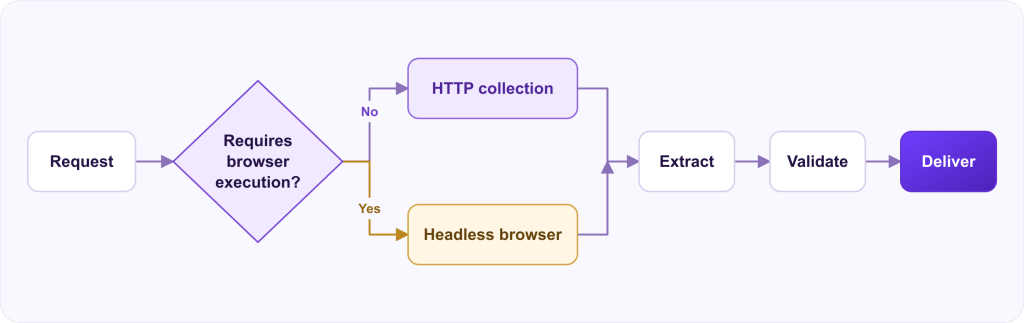
A practical decision gate runs before you allocate a browser:
- HTTP-first when the resource is static or server-rendered, when the critical fields appear in the first document without client-side rendering, or when you can reproduce the same network calls the page makes—without executing the UI stack.
- Browser-required when content is assembled only after JavaScript execution, when interaction (scroll, click, tab switch) unlocks the data, or when the page’s own logic decides what to render based on a full browser environment.
Teams that skip this gate pay twice: they run Chromium for pages a lightweight HTTP client would serve in milliseconds, and they still need browsers for the genuinely hard subset—only now with less capacity left for it.
The decision also depends on why a browser is being used: to render the content, or to manage the access layer around it. Bringits’ web data unblocker API manages IP rotation, fingerprints, sessions, and rendering behind a single API, reducing the browser infrastructure your team needs to operate. Pages that require interactive navigation still need to be evaluated separately.
CPU and memory: the cost of a full rendering stack
An HTTP client downloads bytes and parses headers. A headless browser downloads bytes, parses HTML, builds a DOM, executes JavaScript, applies CSS, runs layout, paints (even when nothing is displayed), and maintains internal caches, service workers, and—typically—multiple OS processes per instance.
Compared with HTTP-based collection
To make the gap concrete: a single HTTP worker can hold hundreds of concurrent in-flight requests within a few hundred megabytes. A browser context rendering one heavy page can consume a comparable amount on its own. At cluster scale, that ratio becomes your sizing document.
The resource profile at scale:
- Memory dominates when many contexts stay alive. Per-context footprints multiply quickly on heavy pages, and leaked contexts accumulate silently across jobs.
- CPU spikes during script execution, image decode, font handling, and layout on complex sites. Throughput per node is often bounded by CPU long before network bandwidth is exhausted.
- Disk and I/O matter once profiles, caches, and crash dumps accumulate on workers that run for days.
The point is not that HTTP is always cheaper—some targets truly require rendering. The point is that browser work consumes a full general-purpose runtime per logical page, and that cost does not disappear with horizontal scaling; it multiplies with it.
Latency: rendering sits on the critical path
For a single page, browser latency is the sum of navigation, main-thread work, secondary requests, and whatever wait strategy you use (networkidle, selector visibility, a custom predicate). Under load, tail latency grows: garbage collection pauses, contended CPUs, and queueing behind other tabs on the same instance.
At scale, p95 and p99 matter as much as averages. A pipeline targeting one million pages per day cannot treat “30 seconds occasionally” as an edge case: at a 1% rate, that is thousands of stragglers per day, each one holding a slot, a session, or a lease on shared infrastructure.
Common latency amplifiers:
- Waiting for “full quiet” on pages that never stop polling
- Loading ads, analytics, and third-party widgets unrelated to your fields
- Sequential navigation inside a single context where parallel HTTP would suffice
- Cold starts when every job launches a brand-new browser process
Concurrency: why “just add more browsers” stops working
Concurrency for HTTP clients is mostly connection pools, rate limits, and polite parallelism. Concurrency for browsers is process limits, file descriptors, memory ceilings, and orchestration overhead.
Hundreds of concurrent browser instances on one machine often fail for mundane reasons: OS process limits, OOM kills, degraded scheduling, or storage pressure from temporary profiles. Thousands across a cluster introduce a different problem: coordination. Who owns which sticky session? How do you restart a subset without draining the fleet? How do you avoid a thundering herd when every worker cold-starts Chromium after a deploy?
Effective patterns cap browsers per host below the theoretical maximum, keep pools of warm instances, reuse contexts carefully (with strict isolation rules where sessions must not bleed between jobs), and push as much work as possible to HTTP workers that can run at far higher fan-out.
Session and state management
Browsers imply state: cookies, localStorage, IndexedDB, service workers, authenticated sessions, and sometimes tokens bound to a prior login flow. At small scale, state is “set a cookie once.” At large scale, it is durable session storage, rotation on expiry, isolation between workloads, and replay rules when a session is invalidated mid-crawl.
State also constrains scaling out: not every request is interchangeable. Two browser workers may not be able to swap jobs without breaking continuity. That constraint reduces effective parallelism and deepens queues for authenticated or multi-step flows—precisely the flows most likely to need a browser in the first place.
Network overhead and unnecessary work
A browser faithfully loads what the page asks for unless you intervene. For data extraction, much of that work is waste: fonts, images, media, beacons, and scripts that never affect your fields. Blocking routes and disabling images helps, but the maintenance cost is real—sites change their asset patterns, and overly aggressive blocking breaks rendering elsewhere.
Even with blocking, browsers still pay for the main document and critical JavaScript on the critical path. An HTTP collector requests exactly the endpoint that carries the data. That gap is the throughput and cost difference on every target that does not actually need a DOM.
Orchestration in distributed environments
Distributed browser scraping shares the usual scheduling problems—partitioning, idempotency, backpressure—but with far heavier workers:
- Job sizing: keep browser jobs short; split long crawls into bounded steps
- Affinity: session-bound work routes to workers that hold the state, with explicit failover rules
- Backpressure: when pools saturate, reroute HTTP-eligible work or delay it; do not let queues grow unbounded
- Deploy safety: rolling restarts that drain in-flight browser jobs instead of mass-timing them out
- Isolation: separate pools for heavy interactive targets and lightly rendered pages, so one noisy target cannot starve the rest
Kubernetes (or any scheduler) will happily keep placing pods until the node OOMs. Browser workloads need resource requests and limits grounded in measured memory, not in generic “small service” defaults—otherwise scalability looks fine on paper until nodes fail under real browser load. Browser capacity is only one part of the reliability equation. Even a well-sized browser pool can feed a pipeline that loses records, amplifies retries, or falls behind at the delivery stage. These broader concerns are covered in web scraping at scale, including workload isolation, backpressure, and measuring usable data rather than request volume alone.
Monitoring and observability
HTTP success rates are not enough for a browser layer. Instrument at least:
- Navigation outcome (success, timeout, crash, blocked)
- Time spent in wait predicates vs. script execution
- Pool utilization, queue wait time, restarts per hour
- Memory and CPU per instance, plus child process count
- Extraction success after render (selector present and populated vs. empty DOM)
Correlate browser metrics with downstream validation. A page can “load successfully” while producing empty fields—easy to miss when dashboards stop at navigation, expensive to discover when downstream teams report it first.
A pattern that repeats in practice
A common arc: a team starts with browser-default collection because it is simple and robust. Volume grows, costs grow faster, and someone profiles the traffic. The profile typically shows that a large share of pages render fine over plain HTTP, a slice only needs a browser, and some browser sessions reveal stable XHR endpoints that can be called directly afterward. Each discovery shrinks the browser surface; the remaining pool gets faster and more stable because it serves fewer, genuinely browser-bound targets.
None of this is theoretical—every element above is a failure mode that shows up in production scraping systems, usually during the week it matters most.
Infrastructure cost as volume grows
Cost scales with RAM-hours and CPU-hours, not with URL count alone. Browser-default architectures often show a step function: costs grow roughly linearly until you add a pool tier, larger nodes, or another region—then jump. Egress, proxying, and storage join the bill alongside compute.
Hybrid architectures spend the browser budget on the smallest slice of URLs that actually fails HTTP classification, which preserves margin and headroom for spikes. And the classification deserves periodic re-review: sites add server-side rendering, publish APIs, or change frameworks—what required a browser last quarter may not today.
When a hybrid HTTP + browser architecture wins
A durable pattern:
- Classify URLs or page templates – manual rules, periodic probes, or learned classifiers; the mechanism matters less than the discipline.
- Collect HTTP-eligible work at high parallelism.
- Escalate failures and ambiguous pages to browser workers, under bounded quotas.
- Feed back what browser runs discover – stable endpoints, rendering changes – into the classifier.
The bound on escalation matters. If every transient HTTP error becomes a browser job, the hybrid quietly collapses back to browser-default, with the added cost of running both stacks.
Trade-offs, not a verdict
Headless browsers are not the wrong tool. They are the heavy tool. The headless browser limitations that matter at scale are resource economics, concurrency ceilings, lifecycle fragility, session complexity, observability gaps, and the reliability and scalability constraints that follow – not “browsers cannot render JavaScript.”
The design goal is to know, in your own numbers, when browser-based collection becomes the bottleneck: pool saturation, tail latency, cost per million pages, extraction quality after render. Once those are visible on a dashboard, you can shrink the browser surface deliberately – instead of discovering the ceiling during an outage or a budget review.